
Oxevision: Opt-out consent model
Oxevision (Oxehealth) is a medical device that uses an infrared-sensitive camera to measure your pulse and breathing rate. The system has been installed to improve patient safety and patient experience. This leaflet explains what it is and how it helps staff care for you more safely.
Oxevision is a safety system available in every bedroom on the ward to improve patient safety and patient experience.
If you are having a difficult time in your room, the system can alert staff, allowing them to come and offer support. An example might be if you have been in the bathroom for a long time, or if you have left your bed at night.
The system can also allow staff to take your pulse and breathing rate electronically without disturbing you, helping to keep you safe and well.
It is not a replacement for face to face engagement and observation on the ward. It is an additional tool we can use to help keep you safe. Some wards already use other types of safety alerts.
Staff will be happy to show you how Oxevision supports your safety. In special cases you can talk to the healthcare team about having Oxevision turned off. Staff will explain this to you.
- It helps staff to keep you safe
- Staff can check your pulse and breathing rate remotely
- Oxevision is available in every bedroom on the ward
- It is in a long box above your bed
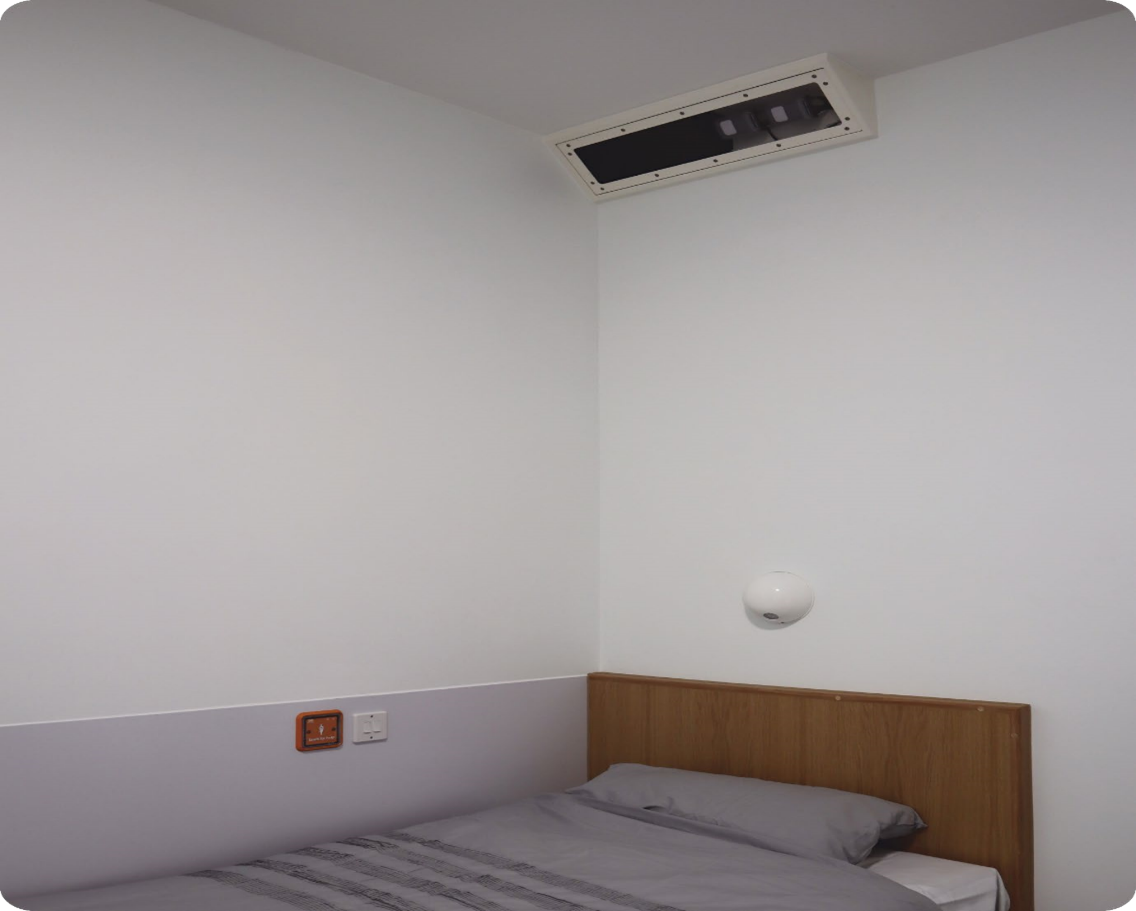
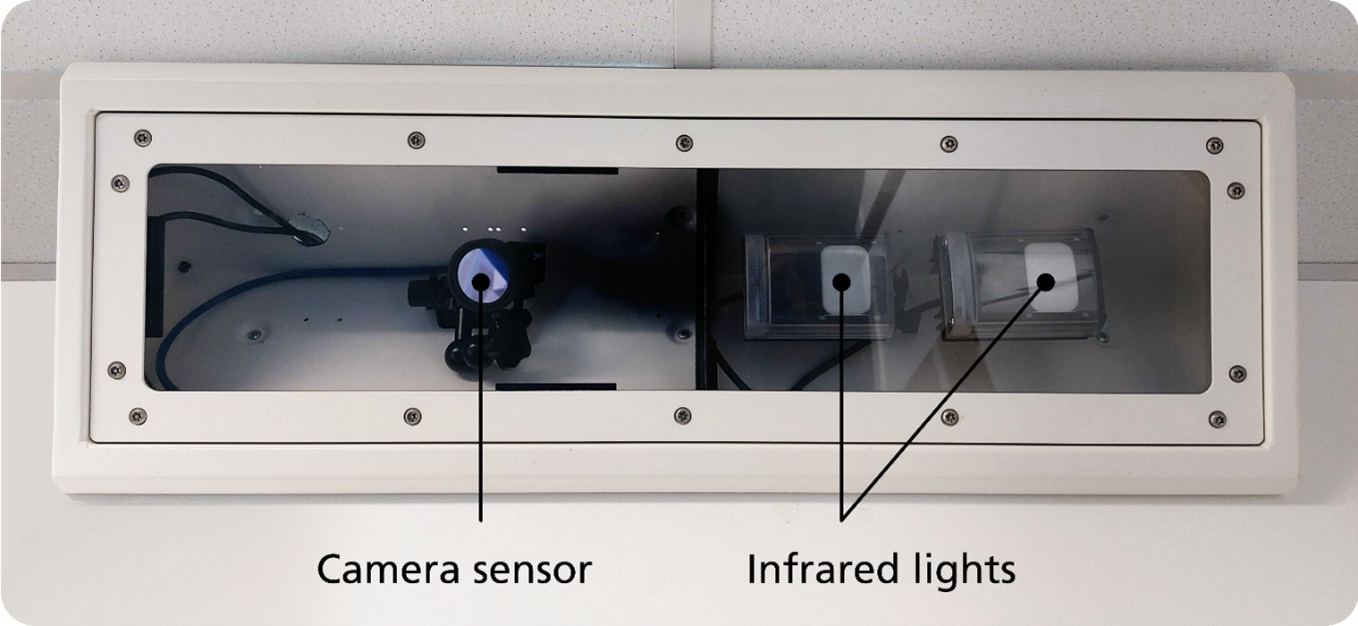
Oxevision is a medical device that uses an infrared sensitive camera to measure your pulse and breathing rate. Infrared is a light which is invisible to the human eye but helps the camera see in a darkened room.
You may notice a red ‘glow’ from the unit in your bedroom. The infrared lights are on all the time but the camera is not.
- It provides notifications to staff as explained below
- It shows staff how long you’ve been resting and how long you've been active
- It does not replace direct staff care during your stay
The system can monitor you within your bedroom, but not in your bathroom or any other private spaces.
- Staff can only see into your room for a maximum of 15 seconds when checking on your physical health (like taking your vital signs or thinking you may need some help in your room)
- Staff cannot constantly observe the camera and will only be able to see the feed if they are alerted or required to check your physical observations
- The system will only measure your vital signs when staff take an observation
- It will not alert staff to a change in vital signs, for example if your heart rate or breathing increases or decreases
- It does not detect sound
You can ask to see how Oxevision works . Staff will be happy to show you how the system can support your safety.
Staff receive information and notifications:
- On electronic tablets they carry with them on the wards
- On a dedicated office computer screen
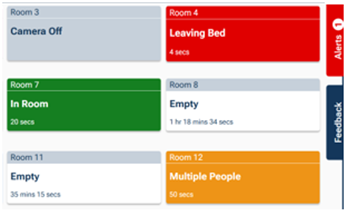
There are four types of notifications that staff can see and respond to:
- Out of room: When you have left your room
- In bathroom: When you enter the ensuite bathroom and when you have been in there for a long time
- At door: When you are standing or sitting close to the main door and when you have been there for a long time
- Room entry: When another person enters your room while you are already in the room
If you need help always speak to a member of staff.
Staff can:
- Measure your pulse and breathing rate
- Receive information on your active and resting periods, which you might then discuss with your named clinician
A clear image can be seen for up to 15 seconds only when checking your pulse and breathing rate. Your pulse rate is measured by counting the number of times your heart beats per minute (BPM).
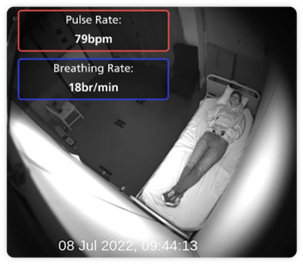
Staff can also view via the camera sensor if there is an alert when:
- a patient spends a long time in their bathroom
- multi room occupancy
- leaving bed or out of bed
A blurred image of the bedroom can then be seen for up to 15 seconds:
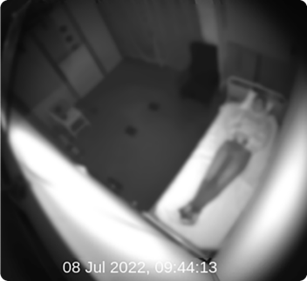
Staff have no access to clear images that are recorded.
- Your personal data is protected by NHS regulation and national law
- Clear video images are recorded but are automatically deleted 24 hours later
- All other data kept is anonymous (non-personal) and is only used to ensure Oxevision is working as it should
- Staff can request short clips of recorded images when there is a safety incident
- If recorded images are used for a safety review, you have the right to be informed.
You have the right to request that the system be turned off. Your responsible clinician and the multi-disciplinary team (MDT) will discuss with you if switch off is clinically appropriate.
If you go on overnight leave and you had agreement for Oxevision to be switched off, the system will be turned on in your room while you are away. When you return to the ward the nurse in charge will discuss with you changing the system back to what it was before your leave if it is safe to do so.
If you are taken to seclusion or 136 suite during your stay there is no option to turn the system off in these rooms.
Please speak to your named nurse for further information.
This video will show you:
- what Oxevision is
- what it looks like
- how staff use it
Do you want to know more or have concerns?
Please ask your named nurse or ward manager if you have any questions. Staff will be happy to show you how it works and provide further information.
Use this link to view the Trust’s privacy notice: www.
If you want to make a comment, suggestion, compliment or complaint you can:
- talk to the people directly involved in your care
- ask a member of staff for a feedback form, or complete a form on the Trust website www.cntw.nhs.uk/contact/complaints
- telephone the Complaints Department 0191 245 6672
- email complaints
@cntw.nhs.uk
We are always looking at ways to improve services. Your feedback allows us to monitor the quality of our services and act upon issues that you bring to our attention.
You can provide feedback in the following ways:
- the quickest way for you to do this is to complete our short online survey at www.
cntw.nhs.uk/ yourvoice - complete a Your Voice survey, available on wards, reception areas or from staff
- other options for sharing your feedback and experience www.
cntw.nhs.uk/ yourfeedback
Patient Advice and Liaison Service (PALS)
PALS provide confidential advice and support, helping you to sort out any concerns that you may have about any aspect of your or your loved one's care.
We act independently when handling patient and family concerns, liaising with staff, managers and, where appropriate, relevant organisations, to negotiate prompt solutions. If necessary, we can also refer patients and families to specific local or national-based support agencies.
North of Tyne
Telephone: 0800 032 0202
Email: pals
Post: FREEPOST PALS
South of Tyne
Telephone: 0800 328 4397
Text: 07825 061 035
Email: pals
Post: Patient Advice and Liaison Service, Garden Lodge, Hopewood Park, Ryhope, Sunderland, SR2 0NB
9.00am – 4.30pm, Monday to Friday
An answerphone is available at all times for you to leave a message. A member of the PALS team will aim to return your call as soon as possible.
Further information about the content, reference sources or production of this leaflet can be obtained from the Patient Information Centre. If you would like to tell us what you think about this leaflet please get in touch.
This information can be made available in a range of formats on request (Braille, audio, larger print, easy read, BSL or other languages). Please telephone the Patient Information Centre on 0191 246 7288
Published by the Patient Information Centre
2025 Copyright: Cumbria, Northumberland, Tyne and Wear NHS Foundation Trust
Ref: PIC/892/0825 August 2025 V5
Review date August 2026
Website: www.